
DoFollow

It does the typing.
You press submit.

Every directory asks the same dozen questions. Answer them once — or let it read your site and answer them for you.

Download for Mac v0.6.6 · 3 MB Runs on Claude

Magic cursor

Double-click a field, only that field fills. The newsletter box is left alone — it was never yours to fill. Recorded from the extension; the pointer is drawn in.

Install

About five minutes, once. Your computer will ask twice whether you trust the app, because it is not sold through an app store. Each question is shown below, with the button to press circled.

Part 1 · The app

  1. Unzip the download and move both things out of Downloads. Drag DoFollow into Applications. Put the Chrome extension folder somewhere you will not tidy away, like Documents — Chrome reads it from there every time it starts, and the extension vanishes if the folder is deleted.
    DoFollow-mac
    DoFollow
    Chrome extension
    Read me first.txt
  2. Double-click DoFollow. macOS stops it — press Done. Not Move to Bin. That is the blue default and it deletes the app. Nothing is wrong with the app; it just is not signed with a paid Apple certificate.

    “DoFollow” Not Opened

    Apple could not verify “DoFollow” is free of malware that may harm your Mac or compromise your privacy.
    DoneMove to Bin
  3. Open System Settings → Privacy & Security, scroll down, press Open Anyway. It is in the Security part near the bottom, and only appears in the hour after the step above. Take me there →
    Wi-FiBluetoothGeneralNotifications Privacy & SecurityDesktop & Dock

    Privacy & Security

    Security

    Allow applications fromApp Store & Known Developers ⌃
    “DoFollow” was blocked to protect your Mac.Open Anyway
    Apple could not verify “DoFollow” is free of malware that may harm your Mac or compromise your privacy.
  4. Confirm with Touch ID or your password, then Open Anyway once more. macOS never asks about DoFollow again.

    Open “DoFollow”?

    Apple is not able to verify that it is free from malware. Open it only if you trust where it came from.

    Open AnywayMove to BinDone
  5. DoFollow offers to install Claude Code — press Install. Claude Code is what holds your Claude login; DoFollow never sees it. About a minute. If you have no Node, it also fetches a small runtime first. After that nothing opens — DoFollow runs quietly in the background and says “Running” in a notification.

    DoFollow

    DoFollow needs Claude Code — that is what holds your Claude login.

    Install it now from claude.ai? It takes about a minute.

    Not nowInstall

Part 2 · Chrome

  1. Go to chrome://extensions and switch on Developer mode, top right. Chrome will not open that address from a link — paste it into the address bar.
    chrome://extensions
    ExtensionsDeveloper mode
    Load unpackedPack extensionUpdate
  2. Click Load unpacked and choose the Chrome extension folder. Select the folder itself, not a file inside it. DoFollow then appears in the list — leave it switched on.
    Load unpackedPack extensionUpdate
    DoFollow — submission autofillFills directory, launch-platform and press submission forms…
  3. Pin it: click the puzzle piece in Chrome’s toolbar, then the pin next to DoFollow. Its icon now sits beside the address bar. Click it, then Setup at the bottom.
    yoursite.com
    Extensions
    DoFollow — submission autofill
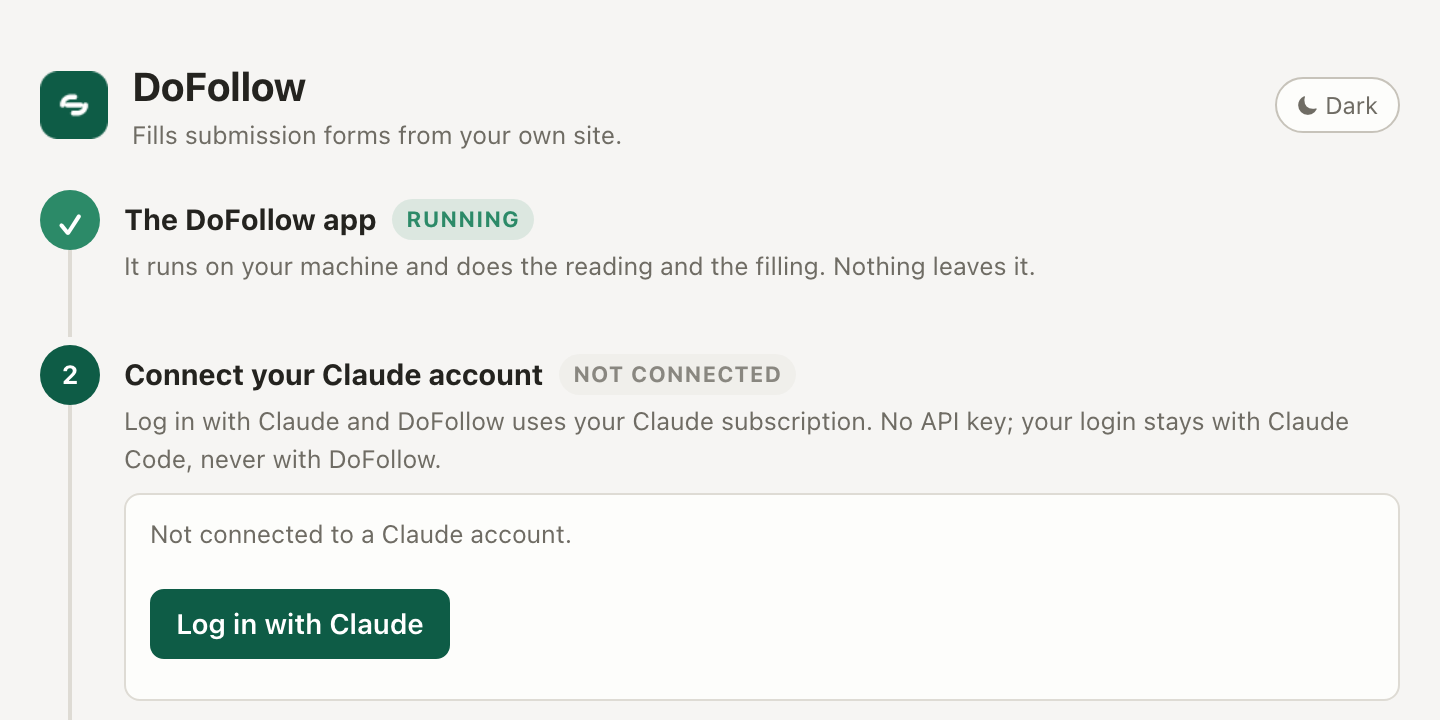
  4. On the Setup page, press Log in with Claude. claude.ai opens in a new tab; choose your account and approve. The Setup page ticks itself green — no key to copy, nothing to paste. The first line must say Running; if it says not open, open the DoFollow app again.
    The DoFollow Setup page: the app is Running, and a Log in with Claude button under Connect your Claude account.
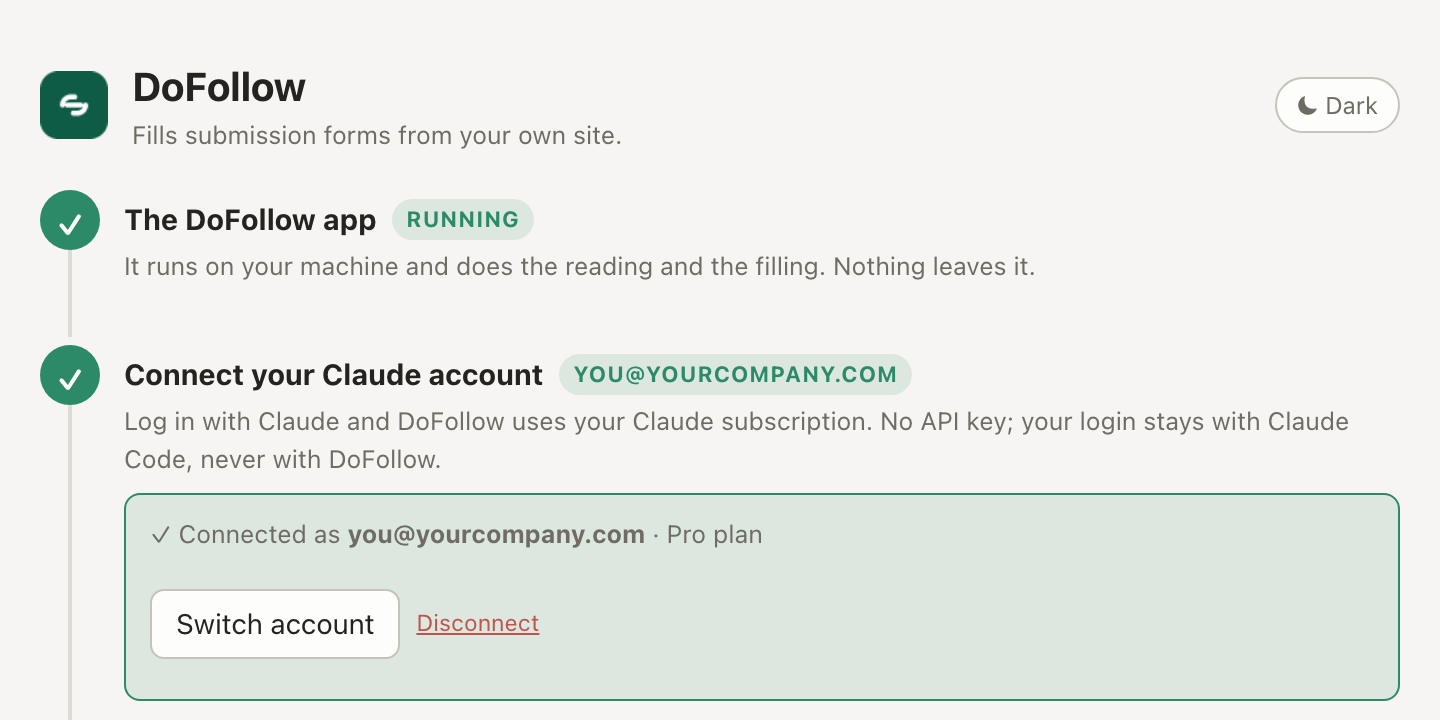
  5. Done when both are ticked. Add your site under Your projects. DoFollow reads it once and answers what directories ask. Then import your list on the Batch page and start the first five.
    The DoFollow Setup page with the app Running and the Claude account connected.
Stuck?
I pressed Move to Bin.
Download it again and repeat — that button deletes the copy you had.
There is no Open Anyway in System Settings.
Double-click DoFollow once more and press Done; the button only appears for about an hour afterwards.
Setup says the DoFollow app is not open.
Open the DoFollow app again (Applications on a Mac, the folder you extracted on Windows), then press I've opened it. It has no window or Dock icon by design.
It says Claude Code isn’t installed.
You chose Not now earlier. Open the DoFollow app again and press Install.
The extension disappeared from Chrome.
The Chrome extension folder was moved or deleted. Put it back somewhere permanent and Load unpacked again.

Your profile, your list and your images stay on your computer — the app is only the part Chrome is not allowed to do. Also available for Windows.

What it does

Reads your site once
Descriptions ready at every length a directory asks for.
Fills the form, never submits it
Green matched, amber inferred, red left for you. The last click is yours.
Five sites at a time
Import your list. It opens five tabs and fills each as its form appears.
Skips what you cannot qualify for
Open-source-only, when yours is not. Archived with the reason, before a tab opens.
Writes what it cannot look up
Double-click one field for a draft, or a reply to a question, in your own voice.
Checks the link is real
Finds it on the live page and records whether it is dofollow.

Worth knowing

Needs Chrome and a Claude subscription — nothing else to install by hand. The first time you open the app it offers to set up Claude Code, which is what holds the login, and brings its own runtime if your machine has no Node. No API key, nothing to pay per form. Without Claude it still fills most of a form from rules alone.

Mac is well travelled; the Windows build is new. If it misbehaves, say so and it gets fixed.

It will not press submit, invent a founding year to clear a required field, fill a login page, or touch a password or a consent box.