SEO blog writing services: what to check before you pay
SEO blog writing services compared: what they include, what a post costs, five checks before you pay, and how blogwriter.pro fits.
SEO blog writing services all sell one promise: posts that bring search traffic. They deliver very different things. Before you pay any of them, check who does the research and where each number comes from. Then look at what's in the brief. Then ask how a post reaches your site, and who presses publish.
In short: Judge SEO blog writing services on the brief and who presses publish, not the price. Freelancers charge about 25 to 45 cents a word. blogwriter.pro is one way to do it yourself, on a Mac.
I write for blogwriter.pro, so I'm on the seller's side here. Weigh what I say about it that way. The checks and the numbers hold up without it.
What SEO blog writing services should hand you
The post is the smallest part. Ask what comes with it.
- Keyword research: which phrase the post targets, and whether you already have a post on it.
- A brief: the reader's question and the angle, plus what you can't claim.
- A researched draft, with a source for every figure.
- The on-page basics: a title and description that fit, a short answer near the top, clear headings.
- Links to your other posts.
- Pictures or diagrams.
- A way onto your site.
Some services stop at the draft. Others do the lot. Neither is wrong, but they cost different amounts, so compare like with like.
Nobody can promise a rank. A service that does is guessing. Read that as a warning.
What a post costs?
For freelancers there's a neutral benchmark. The Editorial Freelancers Association ran a survey from November 2025 to mid-January 2026, with more than 1,100 respondents. Its 2026 rate chart puts blog posts at 25 to 40 cents a word for ghostwriting and 25 to 45 cents for work-for-hire. On a 1,500-word post that's about $375 to $675, by my arithmetic. The EFA says it doesn't set rates, and they move with expertise and turnaround.
Agencies mostly quote retainers. The ranges I found were published by companies that sell them, so I'm not quoting one. Ask for a price per post.
| Route | Price | Worth knowing |
|---|---|---|
| Freelance writer | 25 to 45 cents a word | Rates vary with expertise and turnaround |
| Agency | Ask for a per-post figure | Contracts vary a lot |
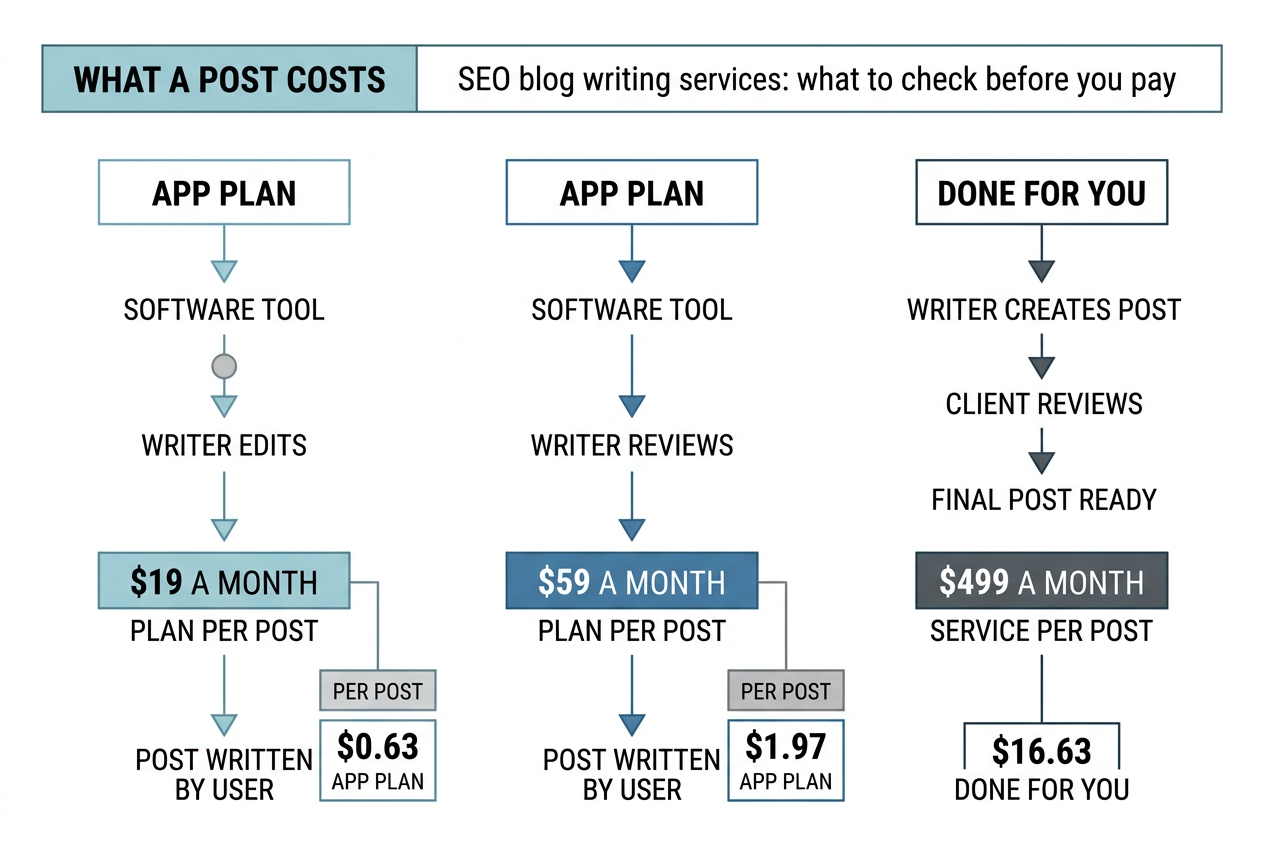
| blogwriter.pro app plans | $19 or $59 a month, up to 30 posts | Needs your own Claude subscription |
| blogwriter.pro Done For You | $499 a month, a post a day | Sold in 10 slots |
At the cap, $19 for 30 posts is about 63 cents a post. $59 is about $1.97. Done For You, taking a post a day as 30, is about $16.63. That's my arithmetic, and it isn't like for like. It leaves out your Claude subscription, whose price isn't on the site. It leaves out your own image key on the $19 plan. It also leaves out your time to brief it, then read it and publish it. Use the numbers to size the gap, not to claim a saving.
How Google treats posts made at scale?
Google's spam policy defines scaled content abuse as many pages made mainly to manipulate rankings, and adds "no matter how it's created". Its guidance on generative AI says using such tools to make many pages without adding value for users may break that policy.
So skip "is it AI?" as your first question. Ask whether the post is useful and accurate. Google's own test is about who made it, and how and why. It suggests telling readers how a post was made, and it says content made mainly to attract search visits isn't what its systems reward.
One test: ask for three finished posts and open the source behind one number in each. If you can't, the service can't either.
Five questions to ask before you sign
- Who writes it, and who checks it? Ask whether AI is used, and where.
- Where does each figure come from? Ask to see the source for three of them.
- What goes in the brief? A good one says what you sell and how you sound. It also says what you can't claim.
- How does a post reach my site? As a draft, or live?
- What happens if I stop paying? Do the posts stay?
These are the checks behind blogwriter.pro. Here is how it answers each.
How blogwriter.pro makes SEO blog writing easier?
It reads your site first. You connect your site once and it writes the brief: what you sell and how you sound, plus what you can't claim. Your edits to the brief stick. Then you give it a topic and a keyword.
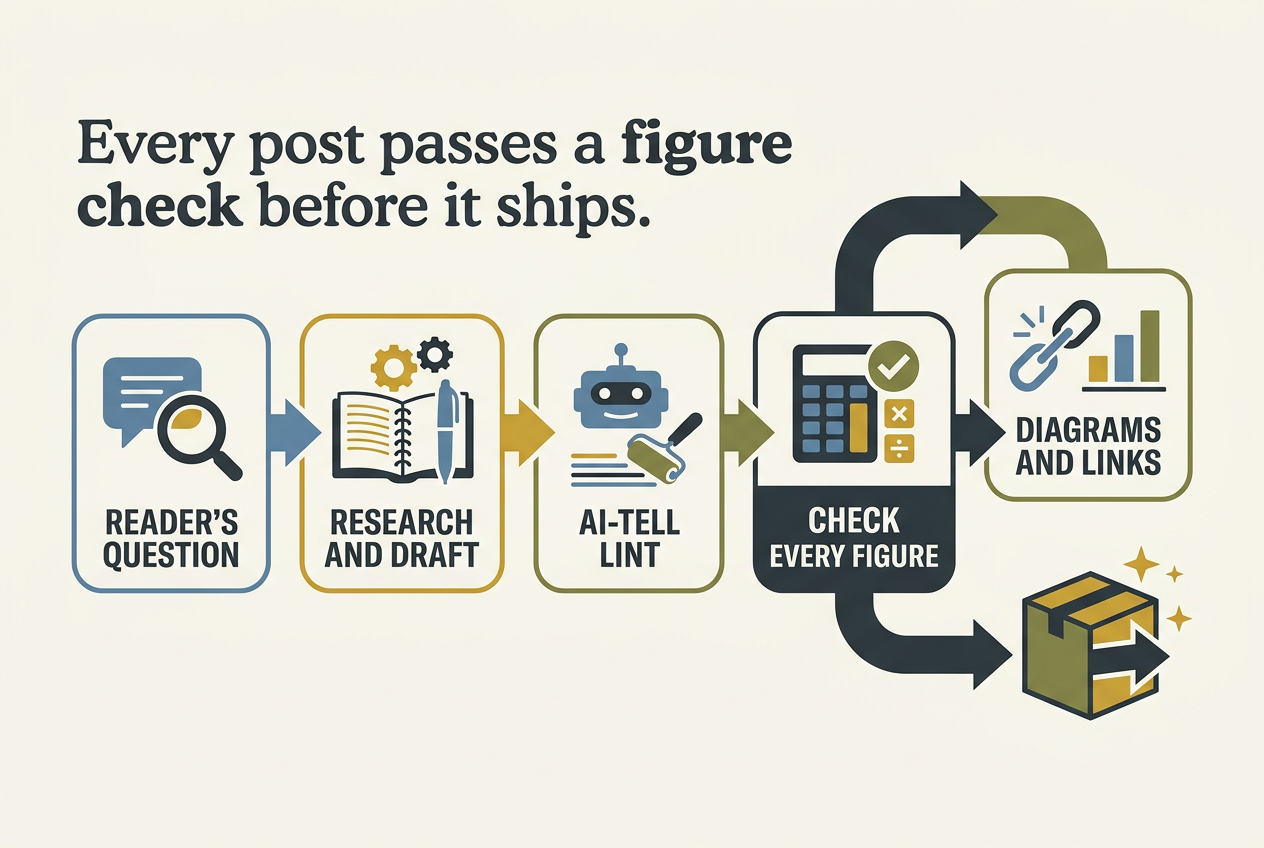
From there the run goes in steps. It starts with the reader's question, then research and a draft. An AI-tell lint comes next, then a check on every figure. Last are diagrams and links to your other posts, and then publish. It refuses to ship a number it can't trace. The run stops instead. That's a design rule, so I'll say traced to a source, not guaranteed correct.
Keyword searches are included on every plan, 40 a month on Bring Your Own and 150 on Everything Included. You don't need an Ahrefs account. It also checks the basics an SEO would: title and description length and a short answer near the top, plus links to your other posts.
Nothing goes live by itself. Preview runs on your machine, and sharing is a second click. Posts reach your site as drafts. Nothing is published until a person does it.
On the app plans the writing runs on your Mac, through your own Claude subscription. The pricing page says only picture prompts and published pictures, plus a one-way hash of your site and post slug, reach the company. On Done For You the posts go into your CMS for you, which means the service handles that connection. If you stop paying, your posts stay where they are.
This post went through the same steps.
What it doesn't do
- It's Mac only, macOS 11 or later. The install page says nothing about Windows or Linux.
- The two cheaper plans need a Claude subscription. Done For You doesn't.
- Your site has to accept posts through a small API. The API spec is written for a developer. If you don't have one, that's the part to plan for. The spec mentions WordPress only as a platform that needs a special case, so I won't claim it works with WordPress out of the box.
- Pictures are capped at 120 a month on Everything Included. Diagrams aren't.
- It promises no rankings and no traffic. There are no results figures on the site, so I have none to quote.
Which route fits
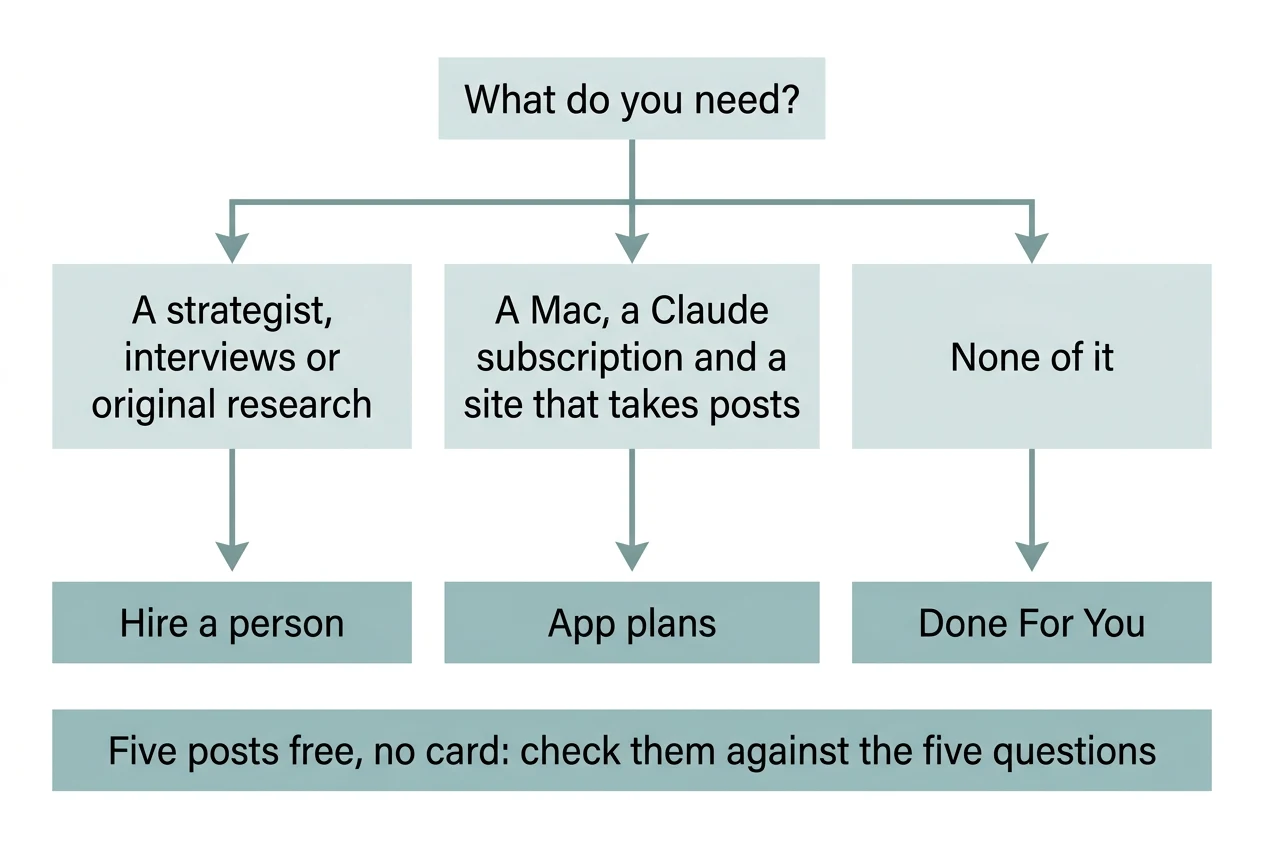
Hire a person if you want a strategist. Same if you want interviews or original research. A tool can't sit in on your customer call.
If you have a Mac and a Claude subscription, plus a site that takes posts, the app plans are the cheap route. See the plans or download the app.
If you want none of it, Done For You is the hands-off one.
Every plan starts with five posts free, no card. Read them against the five questions above. If they don't pass, don't pay.