Download for macOS
Download, drag, done.
Runs on your Mac, on the Claude plan you already have.
Version 0.2.37 · 1.6 MB · Apple Silicon and Intel
Install in four steps
macOS asks once about apps from outside the App Store. Here is exactly what to press.
01
Drag it to Applications
Open the download and drag blogwriter onto the Applications folder.
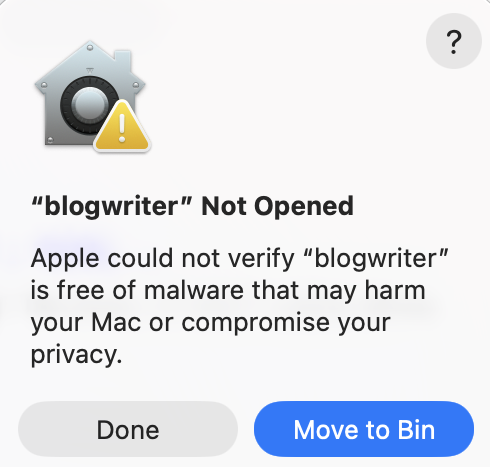
02
Open it, then press Done
Not Move to Bin. It is the default, and it deletes the app.
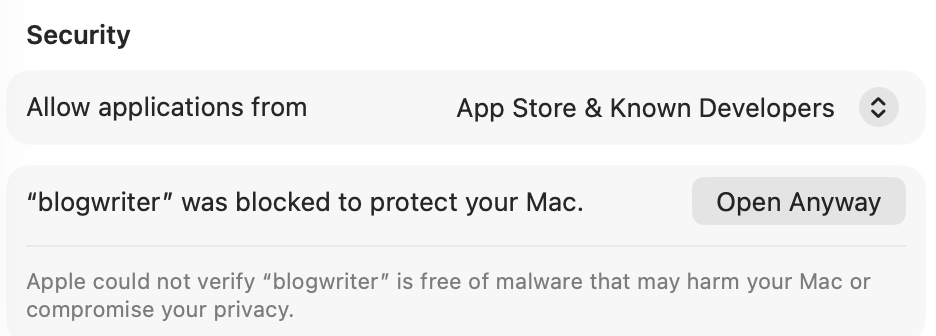
04
Open it once more
Press Open Anyway. macOS never asks again.
Then
- It opens in its own window. First launch takes about a minute.
- Sign in when it asks. It connects itself. No key needed.
- You sign in to Claude yourself. blogwriter never sees the token.
- Updates are a button. Press Update now in the app.
To remove it: Finder → ⇧⌘G → ~/.blogwriter → double-click uninstall.command. Your settings and keys stay.
Or use the terminal
No quarantine, so macOS does not ask. Same files, same places.
$
curl -fsSL https://blogwriter.pro/install.sh | bashRemove: curl -fsSL https://blogwriter.pro/install.sh | bash -s -- --uninstall
Read the script first
The same file that line downloads. It checks the download against a built-in hash and installs nothing if it does not match.