
If you want to write a blog about SEO, the hard part isn't the topic. Everyone has covered the topic. The hard part is having something on the page that a reader can't get from the next ten results.
In short: A blog about SEO is worth reading when it reports what you tried and what happened. Summaries of Google's own guide are everywhere. Your tests are not.
I write for blogwriter.pro, so I'm on the seller's side on writing tools. Nothing below needs one.
The question behind the search
Someone types "blog about seo" and could mean two things. Some want a blog to read, to learn how search works. Others want to start one, and they're stuck on what to say. This post is for the second group. If you're in the first, the last section points at where the primary sources are.
The worry is usually the same: "SEO is so crowded. Why would anyone read mine?" That's a fair worry, and it isn't your fault. The topic rewards copying, because the basics don't change and anyone can restate them.
Why most SEO blogs read the same
Google publishes its own SEO starter guide. It tells you to write clear titles and short descriptions, to use headings properly, to add alt text to images and to link to relevant pages. Most SEO blogs are that guide, reworded.
That's why they blur together. A reader who has seen the advice once learns nothing from the fifth copy, because the fifth copy has no test behind it, no page to check and no result that could have gone the other way, which is what makes advice worth trusting. A post that adds a title tip and a heading tip to the pile is one more copy.
How to start a blog about SEO without repeating everyone else
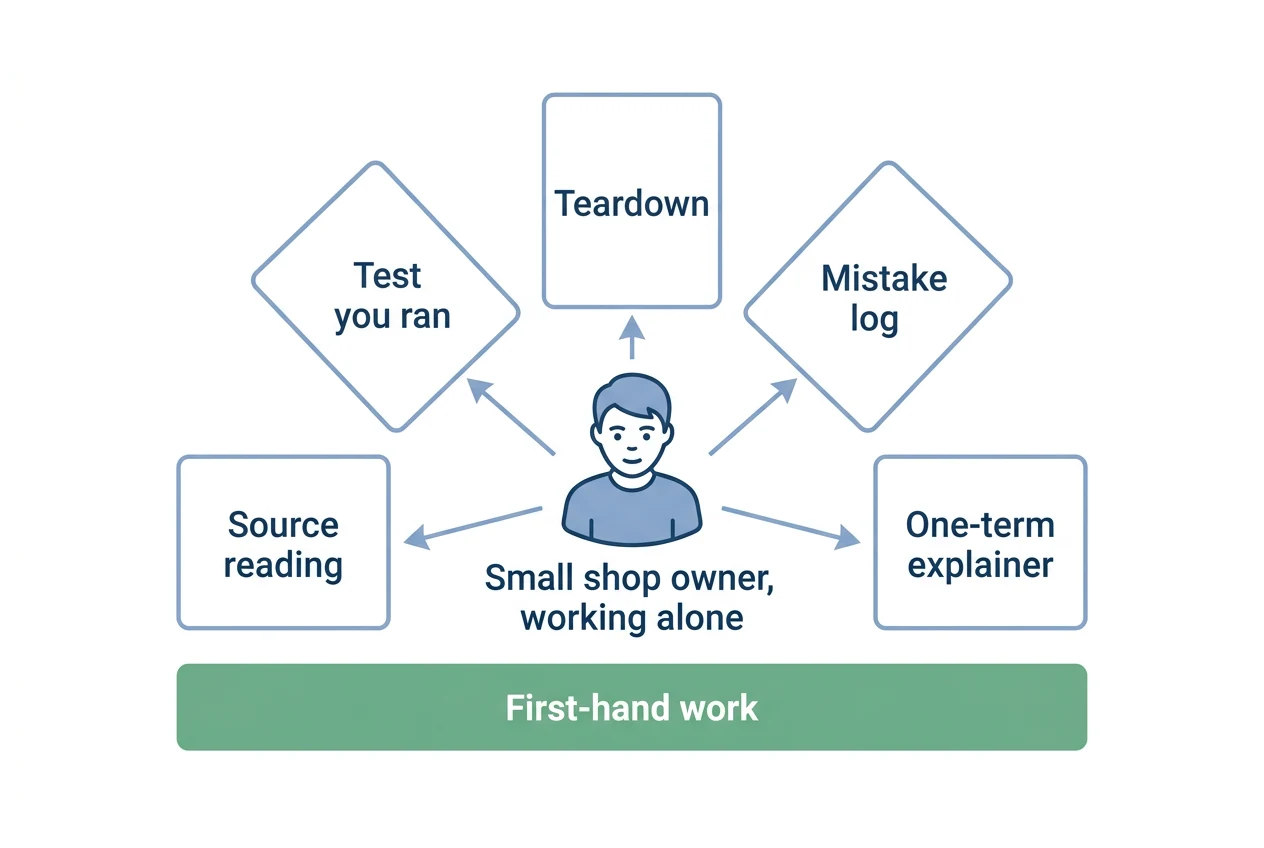
Start small. Pick a narrow reader first. "Business owners" is too wide. "A person running a small shop's blog alone" is a person you can picture. Then answer the questions that person actually asks, in their words.
Some kinds of post that hold up:
- A test you ran. Change one thing on one page, wait, and report what you saw. Say how long you waited. Say what else changed at the same time, because something always did.
- A teardown. Take one real page that ranks and explain what it does, with the page linked so readers can check you.
- A mistake log. What you got wrong, what it cost, and what you do now.
- A plain-English explainer for one term. One term, one page, written for a person who is a little afraid of the jargon.
- A source reading. Go to the primary document, such as a Google help page, and say what it does and doesn't promise.
All five depend on first-hand work. Google's guidance on creating helpful content asks whether content shows "first-hand expertise and a depth of knowledge". You can't fake that for long. Readers can test your claims on their own site.
Say what you can't promise
Nobody can promise a rank. The starter guide says so itself: "There are no secrets here that'll automatically rank your site first in Google."
It also says some changes "might take effect in a few hours, others could take several months", and suggests waiting a few weeks before judging whether your work helped. So an honest post on a test says: here is what I changed, here is how long I waited, here is what I can't rule out.
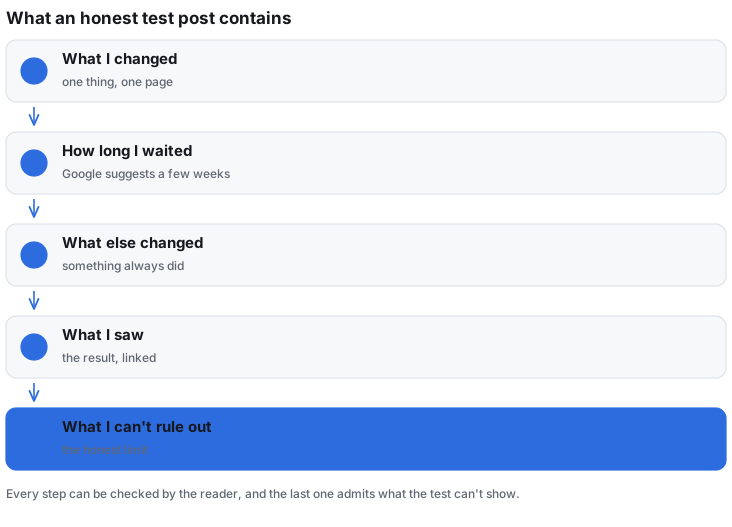
That's also the easiest way to stand out. A blog that says "I'm not sure, and here's why" is rarer than one that says "do this and rank".
What to leave out
- Lists of "ranking factors" you can't point to a source for. If you can't link it, don't write it.
- Claims about traffic gains without the starting point. A rise from nothing isn't a result.
- Posts made in bulk to fill a calendar. Google's guidance asks why a page exists, and calls that perhaps the most important question. A page that exists mainly to attract search visits is the thing it warns about.
- Tool reviews you haven't used.
If you use AI to help write, the same guidance suggests being open about how a post was made. Say so in a line. It costs you nothing.
A simple routine
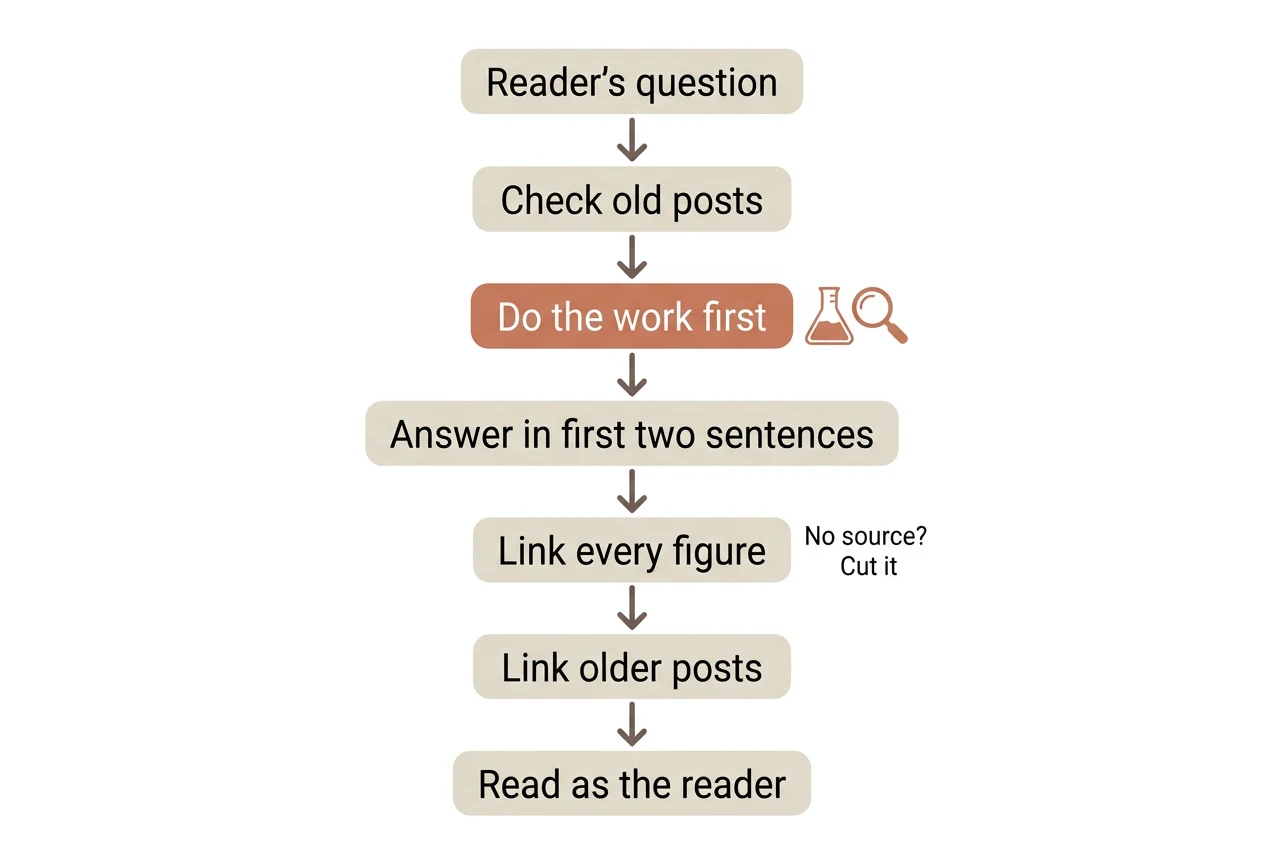
- Write down the reader's question in their own words.
- Check the phrase against your existing posts, so two of yours don't compete for the same search.
- Do the work first: the test, the teardown or the reading of the source.
- Write the answer in the first two sentences, then the story of how you got it.
- Link every figure to where it came from. If you can't, cut the figure.
- Link to your own older posts where they help the reader.
- Read it once as the person who asked. Did they get the answer fast?
None of this is special to SEO. It's how a useful post is made on any subject, and SEO readers are quicker than most to spot a post that skipped step three.
Where tools fit
A writing tool can handle some of the typing, the checks and the links to your old posts. It can't run your test or have your opinion. blogwriter.pro, for example, reads your site first, writes to a brief and refuses to ship a number it can't trace to a source. That's the company's own claim, not something I've verified for you. The input still has to be real work.
If you only want to read, start with Google's starter guide and then read blogs that show their tests. Skip the ones that promise a ranking.